
🏆 All 3rd Anniversary prizes have been announced! Congrats to:
🎉 #262960 Brian Q*** (120cm Rabbit Doll)
🎉 #292791 Joseph C*** (Full Refund)
🎉 Discord member vinny (Lusandy Masturbator)
Thank you for your support! More Giveaways & Exclusive Offers will be held on Discord!
💬 Join Discord to claim prizes & stay tuned!
🏆 All 3rd Anniversary prizes have been announced! Congrats to:
🎉 #262960 Brian Q*** (120cm Rabbit Doll)
🎉 #292791 Joseph C*** (Full Refund)
🎉 Discord member vinny (Lusandy Masturbator)
Thank you for your support! More Giveaways & Exclusive Offers will be held on Discord!
💬 Join Discord to claim prizes & stay tuned!
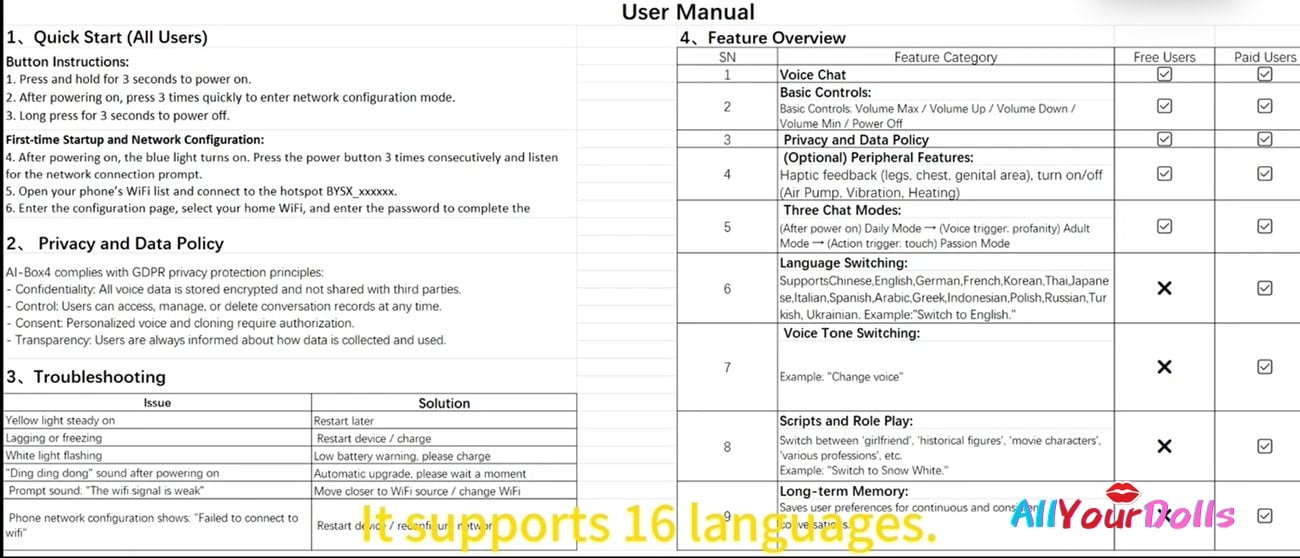
What Are the Key Features of MD Doll AI Box?
MD Doll AI Box transforms your doll into a smarter AI Sex Doll experience by adding intelligent voice interaction, personalized conversations, and advanced companion features. It creates a more realistic robot girlfriend experience while offering convenient control through your smartphone, making it an ideal upgrade for users looking for an app-controlled sex doll solution.
Key features include:
- 16-Language Voice Support – Communicate naturally in 16 different languages and switch languages easily through voice commands.
- Voice-Controlled Character Switching – Change personalities and interaction modes instantly with simple voice commands, such as “Switch to Snow White.”
- Multiple Role-Play Modes – Enjoy different companion experiences with various character settings, including girlfriend, historical figures, movie characters, and professional roles.
- Long-Term Memory – The AI system remembers previous conversations, creating more personalized and natural interactions over time.
- Smartphone WiFi Connection – Connect the AI Box through your smartphone via WiFi for quick setup and convenient daily use.
- Compatible with Multiple Dolls – The AI Box can be used with different compatible dolls, allowing flexible upgrades without replacing your existing companion.
- Free AI Box Included with MD Doll Purchase – Every MD Doll customer receives one AI Box free of charge, including a 3-month free trial after first activation.
AllYourDolls Review:
At AllYourDolls, we believe the MD Doll AI Box is a significant step forward in creating a more immersive and interactive companion experience. With multilingual voice support, long-term memory, flexible role-play options, and easy smartphone control, it helps bridge the gap between traditional dolls and modern AI-powered companions. For customers looking to upgrade to an AI Sex Doll or Robot Girlfriend experience, the MD Doll AI Box offers one of the most advanced and convenient solutions available today.
Note: For detailed connection and setup instructions, please refer to our video tutorial. If you experience any issues or the instructions are unclear, please feel free to contact our customer support team for assistance.
 US Item Ready Dolls
 Europe Item Ready Dolls
 Canada Item Ready Dolls
 AiBei Doll
 AJL Doll
 AZM Doll (aiomi)
 Angel Kiss
 Butterfly Doll
 Climax(CLM) Doll
 Chocolate Lady
 Dolls Castle
 Elsa Babe Doll
 Evas Doll
 FANREAL Doll
 Firefly Diary Doll
 Fire Doll
 Funwest Doll
 Galatea Doll
 Galaxy Dolls
 Gamelady Dolls
 Gynoid Doll
 iDo Doll
 Irontech Doll
 Jarliet Doll
 Jiusheng Doll
 KiraDols Doll
 Kulovedoll
 JX Doll
 Lusandy Doll
 LingMo Doll
 MD Doll
 MMX Doll
 Moonvale Doll
 Nianta Doll
 Orange In Doll
 PrimeSexDoll
 Qita Doll
 Real Lady
 Realing Dolls
 Ridmii Doll
 Rosretty Doll
 SHEDoll
 Sino Doll
 Sigafun Dolls
 Starpery Doll
 SEDoll
 SY Doll
 Tantaly Dolls
 TopCY Doll
 Top Fire Doll
 WM Doll
 WSG Doll
 XNX Doll
 XT Doll
 XYDoll
 Zelex Doll
 Male Masturbators-Mini Sex Toy
 Custom Doll Head By Photos
 Buy Replacement Heads(Sold Separately)
 Buy Firefly Doll Silicone Head
 Buy Funwest TPE Heads
 Buy Gamelady Doll Heads
 Buy Irontech & Real Lady Silicone Doll Heads
 Buy Kiradols Head Silicone Anime
 Doll Clean | Dry | Disinfection | Repair Accessories
 Doll Storage & Display
 Smart AI & Interactive Upgrades
 Buy Replacement Head (Sold Separately)
 Doll Clean | Dry | Disinfection | Repair Accessories
 Doll Storage & Display